- tooling
- automation
- agents
Autopilot for tickets
 César Pinto Castillo
5 min read
César Pinto Castillo
5 min read
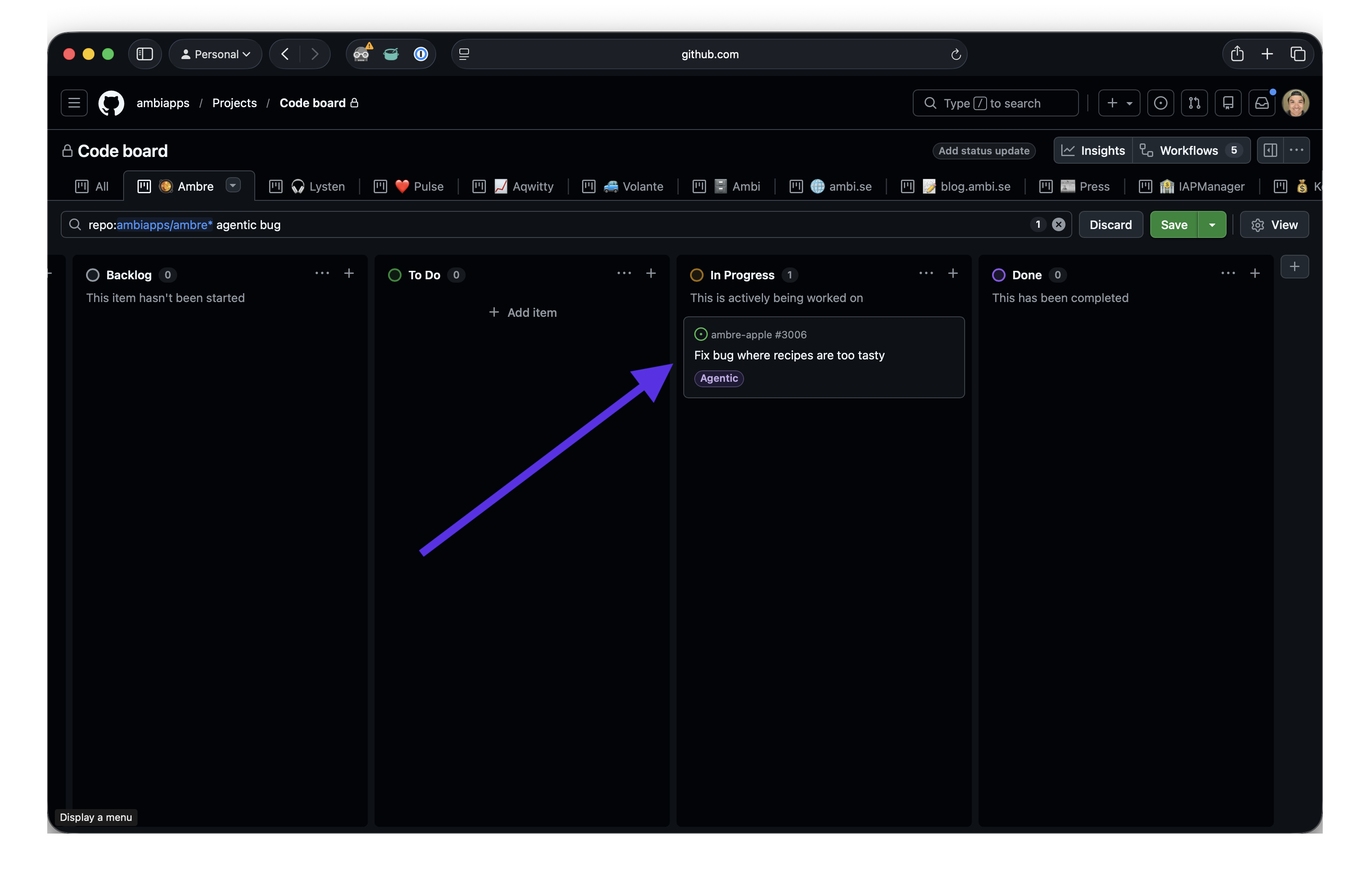
We just wired up our project board so that slapping an Agentic label on a ticket spawns a Claude agent that reads the issue, implements the fix, opens a PR, makes sure it passes CI, and updates the board along the way. Once the PR is merged, a TestFlight build goes out to our beta testers automatically. It turns the project board into the interface — tickets come in, fixes land in testers’ hands.

The idea
We already triage bugs and small tasks into GitHub issues and track them on a GitHub Projects board. Most of those tickets — crash fixes from Sentry, tiny refactors, copy changes — are well-scoped enough that an agent can just do the work. The question was: how do we make “hand this off to an agent” a zero-click operation?
The answer turned out to be a single label and a GitHub Actions workflow.
How it works
The whole thing is one workflow file, triggered on the labeled issue event and filtered to a single label:
name: Agentic

on:
  issues:
    types: [labeled]

concurrency:
  group: agentic-issue-$
  cancel-in-progress: true

jobs:
  solve:
    name: Solve Issue
    if: github.event.label.name == 'Agentic'
    runs-on: [self-hosted, build]
    timeout-minutes: 60
    permissions:
      contents: write
      pull-requests: write
      issues: write
A few things worth calling out:
- Label-driven. We only run when the label is literally
Agentic. Any other label on any other issue is a no-op. - Concurrency per issue. If the label is removed and re-added (or we re-trigger a run), in-flight work for the same issue is cancelled — no two agents racing on the same branch.
- Self-hosted runner. The agent needs Xcode available so it can actually verify its work by building and running our test suite. We run on
[self-hosted, build]because we prefer it, but any cloud-hosted macOS runner with Xcode installed would work just as well. - Scoped permissions. The workflow can write code, open PRs, and edit issues. Nothing more.
The actual run is two steps. First, make sure Claude Code is up to date:
- name: Update Claude Code
  run: brew upgrade claude --greedy || true
We pin nothing here on purpose — we want the agent to have the latest Claude Code on every run. The || true keeps us from failing the whole job if there’s nothing to upgrade.
Then, hand the issue to the agent:
- name: Run Claude Code
  env:
    GH_TOKEN: $
  run: |
    ISSUE_NUMBER=$
    ISSUE_TITLE="$"
    ISSUE_BODY=$(gh issue view "$ISSUE_NUMBER" --json body --jq .body)

    claude -p \
      --allowedTools "Bash(git *),Bash(gh *),Read,Write,Edit,Glob,Grep,mcp__xcode__BuildProject,mcp__xcode__RunAllTests,..." \
      "You are working on issue #${ISSUE_NUMBER}: ${ISSUE_TITLE}

    Issue body:
    ${ISSUE_BODY}

    Follow the instructions in AGENTS.md under 'Working on Agentic Tickets' exactly.
    The feature branch, board updates, implementation, and PR creation are all your responsibility."
Two details matter here.
The allowlist is narrow. We only allow git and gh through Bash, plus file tools and our Xcode MCP tools. No arbitrary shell. The agent can build, test, and read the project, but it can’t go off and curl | sh something.
The prompt is tiny. Most of the behaviour lives in AGENTS.md in the repo — the agent’s standing instructions. The workflow just points at the relevant section.
What lives in AGENTS.md
The prompt above is a one-liner because AGENTS.md does the heavy lifting. The “Working on Agentic Tickets” section tells the agent exactly what to do, in order:
- Read the issue to understand the task.
- Create a feature branch named
feature/<issue-number>. - Move the board item to In Progress.
- Do the work described in the issue.
- Open a PR targeting
mainwithFixes #<issue-number>in the body. - Ensure all PR checks pass before merging.
- Merge automatically unless the issue says otherwise.
- After merge, move the board item to Done.
Right next to that we keep the commands the agent needs for the project board — the project ID, the Status field ID, and a table of status option IDs so it can move cards with gh project item-edit. It’s just a lookup table, but having it in the repo means the agent doesn’t have to guess or poke around the GraphQL API to find the right IDs.
The point of putting this in AGENTS.md instead of the workflow: the same instructions apply when a human runs Claude Code locally and says “pick up issue #3042”. One source of truth.
Why the label instead of a column
We went back and forth on whether the trigger should be the label or moving a card into an “Agent” column. The label won because:
- It’s a native GitHub concept — no Projects API required, and it works even for issues that aren’t on the board yet.
- It survives board reorganisation. We can restructure columns without breaking the automation.
- It’s reversible. Remove the label, and the issue goes back to being a normal human ticket.
The feel of it
What surprised me is how much it changes the shape of a workday. I create a ticket for a crash report in Sentry, slap Agentic on it, and by the time I’m back from lunch the fix is in place and available on TestFlight. Not every run lands like that. Some PRs I reject, and a few I pull locally and iterate on by hand.
It doesn’t replace engineering — it automates the manual, non-creative tasks, giving us more time to focus on more important topics. Things like refining our UX, polishing the UI, deciding what to build next, and actually talking to our users.
Written by
César Pinto Castillo